Chefman website review: kitchen‑appliance webstore walkthrough

Official product page: https://chefman.com
I spent a good amount of time clicking through every corner of Chefman’s official webstore, wandering from the homepage into category menus, product grids and extra resource sections. I tested out how easy it was to jump between different lines of kitchen appliances and paid close attention to every small detail that shapes the full shopping journey.
Category Navigation & Shop‑Browsing Flow
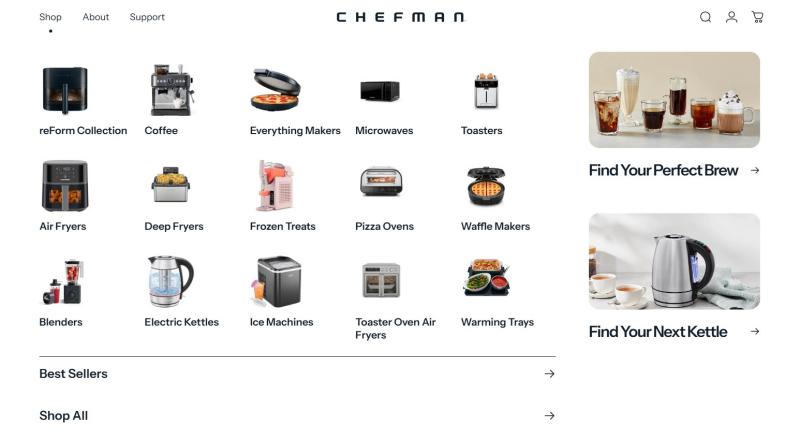
One of my favourite parts of this store is its clean, icon‑driven shop menu. When you click into the main Shop tab, every kitchen‑appliance range appears as its own labelled visual tile. Air fryers, coffee machines, kettles, blenders and waffle‑makers are all separated clearly by task, instead of being dumped into one giant unorganised list. This layout makes instant sense if you already know exactly what kitchen gadget you’re hunting for.
Alongside the regular product categories, there is a dedicated tile for the premium reForm flagship collection, keeping the brand’s high‑end range visible right from the navigation page. The site also includes themed‑shopping suggestion panels on the right‑hand side, acting as a gentle discovery layer with quick‑start buying guides for coffee brewers or electric kettles. I didn’t end up using these guides myself, but they could prove handy for casual browsers just gathering kitchen inspiration. At the bottom of this page, quick‑jump links to Best‑Sellers and Shop‑All act as fast shortcuts for shoppers who want to skip categories and view everything at once.
Listing‑Page Layout & In‑Store Promotional Display
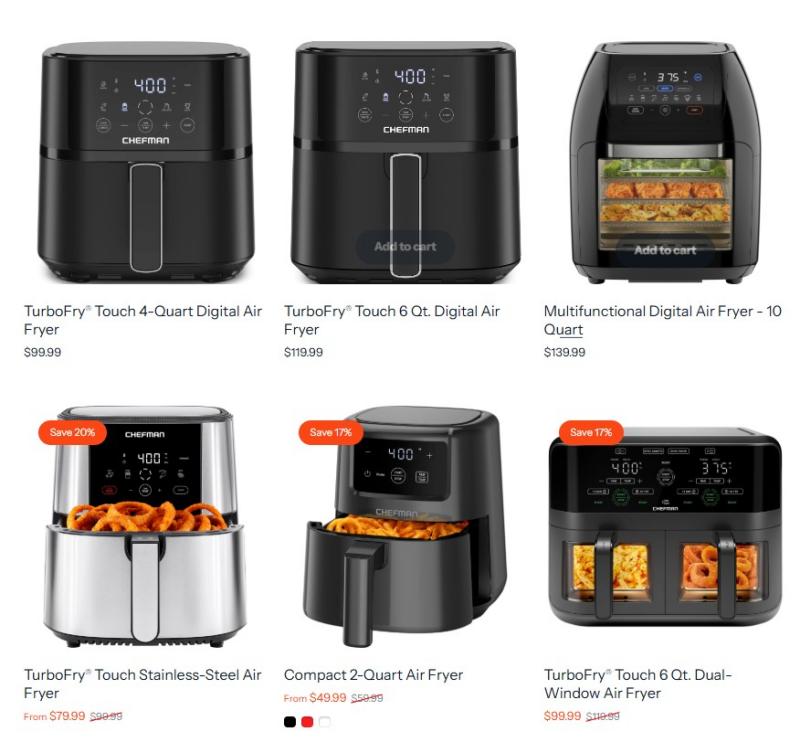
After clicking through to one of the main categories, I landed on a standard grid‑style product listing page. Every item sits inside its own product card with clear pricing front‑and‑centre. What stood out immediately was how the store marks discounted items. Bright, eye‑catching “Save” labels sit directly on top of reduced products, with both the original price and sale price shown side‑by‑side. Shoppers can spot special offers at a single glance without needing to click deep into individual pages.
Each listing card features lifestyle photos showing food cooked inside the appliances, giving you a real‑life preview of what the gadget is used for. One small downside: star ratings and buyer feedback are not displayed on these grid cards. If you want to read other shoppers’ opinions, you will need to open each product page separately to find customer reviews.
Curated Content & Shopper‑Focussed Extra Tools
This webstore offers more than just a place to complete your purchase. There is a whole section called Club Chefman, packed with free‑to‑browse recipes, cooking guides and tutorial content. I flipped through a handful of these recipes, and found the content reasonably solid. It adds useful post‑purchase inspiration once you bring your new kitchen gadget home.
Instruction manual PDFs are available to download directly from the website. This beats the setup you see on many competing brand sites, and removes the frustration of hunting for physical paperwork long after delivery. The site’s promotional strategy stays fairly relaxed. There are no disruptive pop‑ups while you browse; sales information lives only on product cards and top‑of‑page banners.
Wrap‑Up & Verdict
The category layout is intuitive, pricing stays transparent, and there are no annoying pop‑ups getting in your way. The main drawback is the lack of visible customer ratings on listing pages, which makes side‑by‑side model comparisons more time‑consuming. Overall the site is pleasant to browse, yet it falls just short of perfect without built‑in filtering options.